Operations
All images are for reference only. Screens use synthetic Estora development data and do not describe real service availability.
On this page
Day-2 runbook: health checks, metrics, backups, key rotation, retention, audit verification, upgrades.
Setup: Setup and deployment guide · Settings: Configuration · Security: Security and data protection
The CLI: signalhubctl
Bundled in the image at dist-runtime/signalhubctl.mjs (statusctl is a compatibility alias). In a checkout use npm run signalhubctl -- <command>.
docker compose exec signalhub node dist-runtime/signalhubctl.mjs <command>
| Command | Purpose |
|---|---|
preflight |
Validate configuration (secrets, DATABASE_URL, HTTPS URL, proxy hops). Prints JSON, exits non-zero on errors. |
doctor |
Runtime diagnostics. |
migrate [--check] |
Apply migrations, or with --check report whether the schema is current. |
backup [--output FILE] |
pg_dump (custom format) plus a SHA-256 manifest. Needs the pg_dump binary on the machine that runs it. |
restore --archive FILE [--execute --confirm RESTORE] |
Verify the manifest checksum; with --execute --confirm RESTORE run pg_restore --clean. |
audit [--seal] |
Verify the audit hash chain (optionally seal pending entries first). Non-zero exit on a break. |
export --org <orgId> [--requested-by <userId>] |
Queue a full organization data export. |
rotate-encryption-key |
Re-encrypt every stored secret with the active key. |
reset-password --username <id> [--clear-mfa] |
Operator recovery: set a temporary password that must be changed at sign-in. With --clear-mfa, delete the person's authenticator devices and recovery codes and force re-enrollment. |
settings show | export | import | reset [--all | --key NAME] |
Runtime settings from the command line: see them with their sources, back them up, restore a validated file, or reset to defaults when the admin console is unreachable. |
Other scripts: bootstrap.mjs (first admin), migrate.mjs.
Health and metrics
| Endpoint | Meaning |
|---|---|
GET /api/health/live (web) |
Process is running. Use for liveness probes. |
GET /api/health/ready (web) |
Database reachable, migrations current, worker heartbeat fresh (when REQUIRE_WORKER=true). Use for readiness probes and load balancers. |
GET :8081/ready (worker) |
Worker loop is healthy. Used by the Compose healthcheck. |
GET /api/internal/metrics |
Prometheus text format, Authorization: Bearer $METRICS_TOKEN. Returns 404 unless METRICS_TOKEN is set. |
Exposed metrics: Node/process defaults plus status_info, status_notification_jobs{state="pending|dead_letter"}, status_active_workers, status_platform_jobs. Alert on dead-letter jobs > 0, active workers = 0, and readiness failures. Per-monitor uptime is not exported as metrics; use the status API or the UI.
Logs are JSON (Pino) on stdout. Tracing: set OTEL_EXPORTER_OTLP_ENDPOINT.
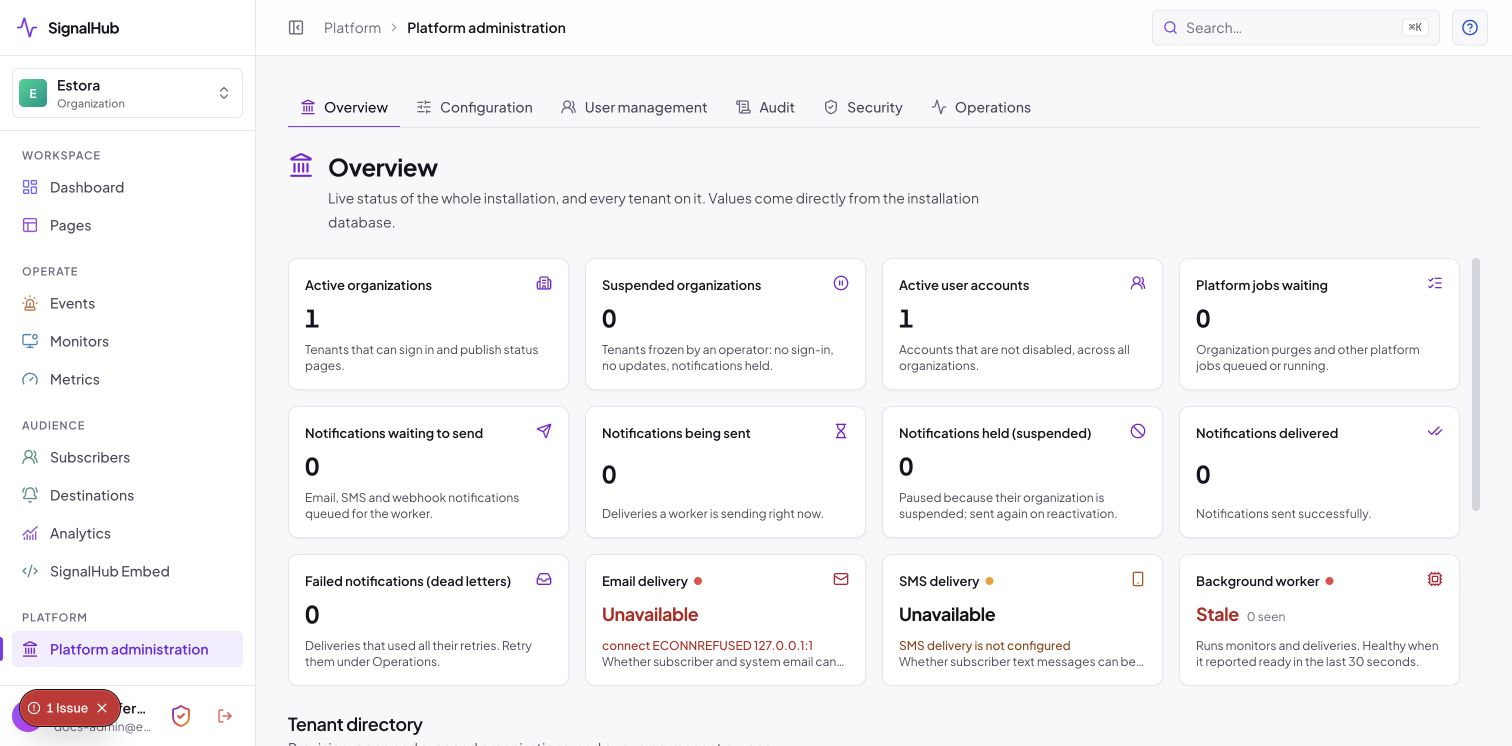
The platform console overview shows the same signals (organizations, queued jobs, delivery dead letters, migrations, worker):
Backup and restore
Back up two things:
- PostgreSQL: all pages, incidents, subscribers (encrypted), audit chain, users.
- Application keys: keep
ENCRYPTION_KEY/ENCRYPTION_KEYSandSESSION_SECRET/its signing keyring in your secret manager or protected config backup, separate from the database dump. The session key signs login sessions; losing it means users sign in again. The encryption key protects stored credentials, MFA secrets and subscriber contact values; without the matching key, those values in a restored database cannot be decrypted. See what each key protects.
Docker Compose
# database (custom format, restorable with pg_restore)
docker compose exec -T postgres pg_dump -U signalhub -Fc signalhub > backups/signalhub-$(date +%F).dump
Schedule with cron or a systemd timer, ship offsite, and keep several generations.
Using signalhubctl (host with PostgreSQL client tools)
DATABASE_URL=postgresql://... signalhubctl backup --output /backups/signalhub.dump
# verify checksum only
DATABASE_URL=postgresql://... signalhubctl restore --archive /backups/signalhub.dump
# restore into an empty database (destructive: drops existing objects)
DATABASE_URL=postgresql://... signalhubctl restore --archive /backups/signalhub.dump --execute --confirm RESTORE
Restore drill (do this before you need it)
- Start an isolated environment (a fresh Compose project or namespace) with the same image version.
- Restore the dump, supply the original
ENCRYPTION_KEYandSESSION_SECRET. - Run
signalhubctl migrate --checkandaudit; sign in and open a status page. - Record how long it took. That is your real recovery time.
For managed PostgreSQL (RDS, Cloud SQL, Azure) prefer the provider's point-in-time recovery in addition to logical dumps.
Rotating keys
Both keys support zero-downtime rotation through keyrings. All keys in the ring stay readable; only the active key writes.
Encryption key
- Add a new key to
ENCRYPTION_KEYS(JSON object ofid: key) alongside the existing one(s) and setENCRYPTION_ACTIVE_KEY_IDto the new id. Restart web and worker. - Re-encrypt existing data:
signalhubctl rotate-encryption-key(reportsrotatedand anyfailedrows; exits non-zero if some failed). - After a successful run and a verified backup, remove the old key from the ring.
Session signing key: add the new key to SESSION_SIGNING_KEYS, set SESSION_ACTIVE_KEY_ID, restart. Old sessions stay valid until they expire or you remove the old key (which signs users out).
Retention and data lifecycle
An hourly sweep applies retention. Defaults: checks 90 days, analytics/metric points 90, notification logs and finished delivery jobs 365, closed service status history 365, expired sessions 30 days after expiry, audit 2,555 days. Organizations can override within platform bounds. Analytics expires by calendar date, including old backfilled rows edited recently. Active status intervals and unfinished delivery jobs are preserved. Tenant rows are removed according to their policy; whole monthly check/metric partitions are dropped only after every tenant's retention window has elapsed. A lease fences duplicate sweeps while allowing the next hourly run.
Public display is independent: default 90 days, with configurable incident/maintenance history in the page's Appearance settings. See public pages and data lifecycle for exact cleanup behavior, sample-data commands, and verification.
Organization exports: Platform administration → Configuration → Organization in the UI or signalhubctl export --org <id>; the worker writes a gzipped JSON archive with a checksum to PostgreSQL.
Audit verification and SIEM
docker compose exec signalhub node dist-runtime/signalhubctl.mjs audit --seal # seal pending entries, then verify
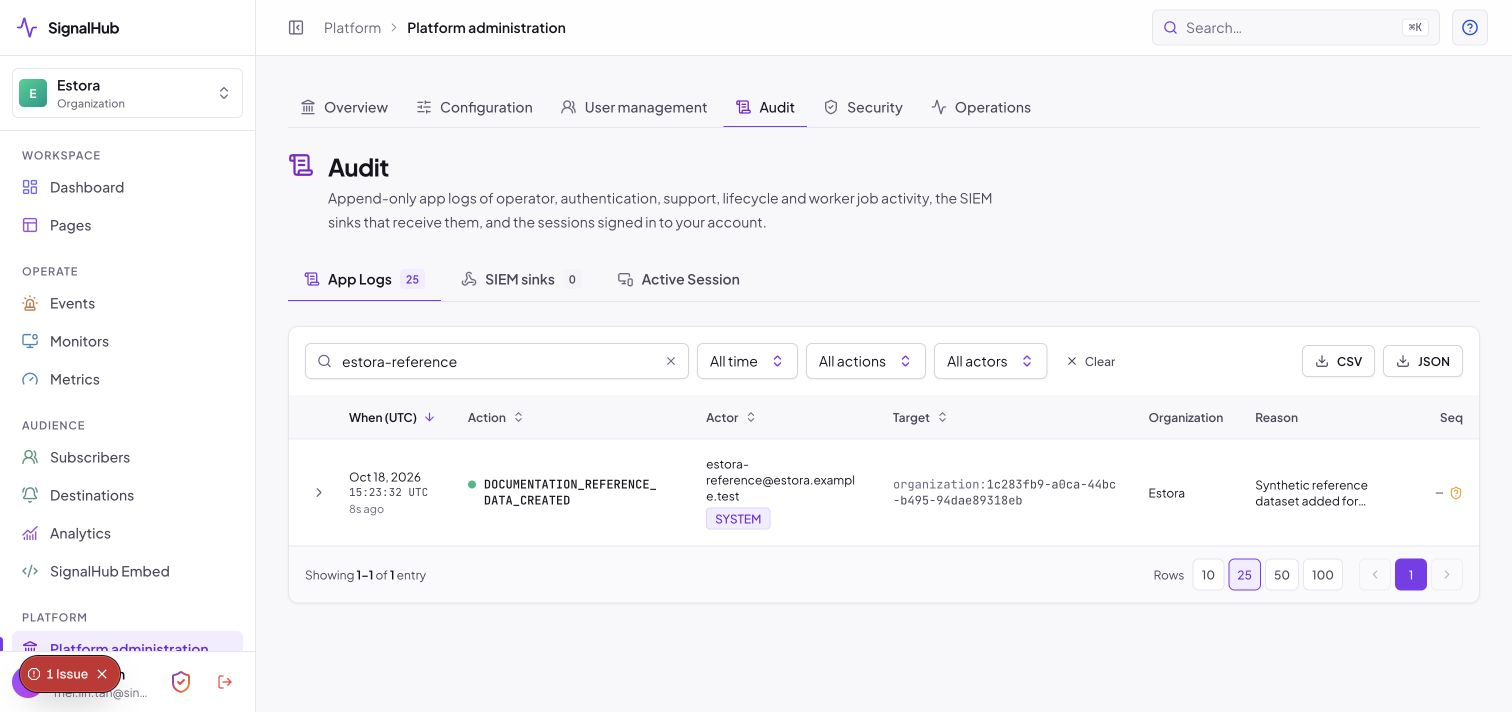
Run it from a scheduled job and alert on a non-zero exit. Configure SIEM sinks in the platform console (Audit): HTTPS endpoint, 32+ character HMAC secret; verify the x-status-signature header on your receiver.
Multi-factor authentication in operation
Turn it on at Platform administration → Configuration → Runtime → Sign-in policy → Require authenticator codes (see the MFA guide). Day to day it needs very little care:
| Situation | What to do |
|---|---|
| Someone is locked out after five wrong codes | They wait 15 minutes, or an administrator opens User management → Unlock. Every lockout is in the audit log (MFA_LOCKED, MFA_LOCKOUT_CLEARED). |
| Someone lost their phone | They choose Can't access your device? on the sign-in screen. Another administrator reviews it under Security → MFA requests and approves with their own code. Requests untouched for 3 days are flagged Overdue. |
| The only administrator is locked out | reset-password --username <id> --clear-mfa from the server shell (above). Break-glass in the console exists for a signed-in sole administrator. |
| You need to sign everyone out | Turning the switch on already ends every other session. For one person: User management → MFA → Reset all MFA. |
| Emails are not arriving | Configure a provider under Configuration. MFA works without email; only notices, "this wasn't me" links and "Email to me" need it. |
The worker sweeps expired removal requests (7 days), abandoned setups (10 minutes), finished sign-in challenges and expired trusted browsers as part of its maintenance round, so there is nothing to schedule. Watch for repeated MFA_LOGIN_FAILED events in your SIEM: five in a row on one account is a lockout, and many accounts from one address is a spray the per-address rate limit (mfa-ip) already slows.
Upgrades
- Read the release notes; back up (database + keys).
- Pull the new image or sources and
docker compose up -d. Migrations run first on start. signalhubctl migrate --check,preflight, and watch/api/health/ready.- Roll back by restoring the backup and redeploying the previous image. Migrations are forward-only.
Scaling
- Worker: run more replicas (leases keep sweeps idempotent) and raise
WORKER_MONITOR_CONCURRENCYfor many monitors. - Web: stateless; add replicas behind your load balancer.
- Database: size
DATABASE_POOL_SIZEsopool × processesstays below Postgresmax_connections; do not put a transaction-mode pooler (PgBouncer transaction mode, Supabase port 6543, Neon-poolerhosts) between SignalHub and PostgreSQL, because it breaks the worker'sLISTEN/NOTIFYand advisory locks. Raisemax_connectionsor use session-mode pooling instead. - Delivery: notifications retry with transient/permanent error classification and end in a dead-letter state you can retry from Operations in the platform console.
Troubleshooting
| Symptom | Check |
|---|---|
| Readiness fails | curl /api/health/ready body; docker compose logs signalhub |
| Dead-letter count rising | Platform console → Operations; usually SMTP/SMS credentials or a destination URL |
| Worker shows Stale | Worker container down or can't reach Postgres; heartbeat must be < 30 s old |
| Audit chain verification fails | Stop, snapshot the database, investigate before anything else; compare with your SIEM copy |
restore rejects the archive |
Manifest checksum mismatch: the dump changed or the .manifest.json is missing |
Lost ENCRYPTION_KEY |
Encrypted credentials and subscriber contacts are unrecoverable; restore the key from your secret manager backup |
Incident records and timelines are retained; Admins and Incident Managers can hide and restore public visibility. Incident history is not removed by the retention sweep.