Setup and deployment guide
All images are for reference only. Screens use synthetic Estora development data and do not describe real service availability.
On this page
Everything you need to take SignalHub from git clone to a production status page on a single host: installer, setup wizard, TLS, email/SMS, upgrades. For Kubernetes and cloud platforms see the deployment overview.
Related docs: Configuration reference · Security and data protection · MFA guide · Operations
Contents
- Architecture and requirements
- Prepare a database
- Install
- The setup wizard
- Verify the install
- Reverse proxy and TLS
- First-run configuration
- Prebuilt container image
- Scaling
- Upgrades and rollback
- Backups
- Troubleshooting
1. Architecture and requirements
SignalHub is two processes sharing one PostgreSQL database. In the default image a small supervisor, dist-runtime/start.mjs, runs migrations and then both processes in one container (Kubernetes runs them as separate pods):
| Process | What it does | Entry point |
|---|---|---|
| web | Next.js app: public status pages, admin UI, platform console, REST API | node server.js (port 3000 in the container) |
| worker | Graphile Worker: monitor checks, notification delivery, exports, audit delivery, maintenance transitions, retention | node dist-runtime/worker.mjs (health on port 8081) |
| start | Supervisor: applies migrations, generates first-boot secrets, runs the setup wizard until a database and administrator exist, then starts web and worker | node dist-runtime/start.mjs (the image's default command) |
The web process never runs background work itself; it enqueues jobs in the database and the worker picks them up. If the worker is down, monitors stop running and no notifications are sent, which is why web readiness depends on a recent worker heartbeat (REQUIRE_WORKER=true).
Requirements
| Minimum | Notes | |
|---|---|---|
| Docker | Engine 24+ with Compose v2.24+ | for the installer and Compose |
| PostgreSQL | 14 (tested with 18) | your own or managed; an optional bundled container exists for trials |
| Node.js | 22.9+ | only for local development or building outside Docker |
| CPU / RAM | 2 vCPU / 2 GB | comfortable for dozens of pages and a few hundred monitors; scale the worker for more |
| Public DNS name + TLS | required for production | see section 6 |
Outbound network access is needed from the worker for monitors, email/SMS providers and webhooks. Inbound access is needed only to the web port, through your reverse proxy.
2. Prepare a database
SignalHub keeps everything (pages, incidents, subscribers, uploaded images, exports) in one PostgreSQL database, which you choose. Create an empty database and a user that owns it:
CREATE USER signalhub WITH PASSWORD 'a-long-random-password';
CREATE DATABASE signalhub OWNER signalhub;
Managed databases (RDS, Cloud SQL, Azure, DigitalOcean, Neon, Supabase…) work as long as you use the direct connection, not a transaction pooler. Have the host, port, database, user, password and, if your provider uses a private CA, its CA certificate ready. The database rules cover TLS and poolers.
Just trying SignalHub? Skip this: the installer can start a PostgreSQL container for you.
3. Install
git clone https://github.com/rameshbgm/signalhub.git
cd signalhub
./install.sh
The installer checks Docker, then asks:
| Question | Effect |
|---|---|
| Domain for HTTPS | Adds Caddy with automatic Let's Encrypt certificates (deploy/compose/https.yml). DNS must point at the host and ports 80/443 must be open. Leave empty to listen on 127.0.0.1:3301 only. |
| Bundled PostgreSQL? | Adds a PostgreSQL container (deploy/compose/postgres.yml) and offers it in the wizard. Default no: you enter your own database. |
| Browser or terminal setup | Where you enter the database and administrator (both use the same checks). |
It writes a small .env (which compose files to use, the domain, the image), pulls ghcr.io/rameshbgm/signalhub:latest (or builds locally if that is unavailable), starts the stack and opens the setup wizard. Re-running it is safe; flags make it non-interactive, for example ./install.sh --yes --domain status.example.com. See ./install.sh --help.
Without the installer: docker compose up -d works with no .env at all. Add overrides with COMPOSE_FILE, for example COMPOSE_FILE=docker-compose.yml:deploy/compose/https.yml and DOMAIN=status.example.com in .env.
Notes on the Compose setup:
- One
signalhubservice runs web, worker and migrations. Itssignalhub_datavolume holds/app/data/signalhub.json: the database connection you enter and the session and encryption secrets generated on first start. Back up this volume, or copy the values into environment variables (they always take precedence). - The web port is bound to
127.0.0.1unless the HTTPS override is used. Containers run as a non-root user withcap_drop: ALLandno-new-privileges. - ICMP (ping) monitors are off by default. See ICMP monitors.
Running on Node.js without Docker
- Production:
npm ci && npm run build && npm run start:allruns migrations, the web server and the worker, and the setup wizard on first start. It listens on127.0.0.1:3301by default (PORT,SIGNALHUB_HOST) and keeps its setup file in./data(SIGNALHUB_DATA_DIR). Node.js guide covers this, a systemd example and upgrades. - Development: with no
DATABASE_URLin.env,npm run devandnpm run dev:allopen the setup wizard. With one, they migrate and start as before.npm run dev:webis the bare Next.js dev server.
4. The setup wizard
Until a database and an administrator exist, SignalHub serves only the setup wizard at /setup; every other page redirects there and the API answers 503 SETUP_REQUIRED.
First-run setup has no unlock code. Keep the instance reachable only to the intended operator until the administrator is created; anyone who can reach /setup before then can configure the database and claim the first administrator.
Database. Enter host, port, database, user, password and the encryption mode (verify certificate, encrypt only, or off), or paste a connection URL. A custom CA can be pasted for RDS, Azure and Cloud SQL. Test connection reports, in plain language, whether it can connect and sign in, the PostgreSQL version, whether the user may create tables, and whether the database is empty, an existing SignalHub database (it will be upgraded) or holds other tables (you must confirm). Also confirm the public URL. Saving installs the schema; the page continues on its own.
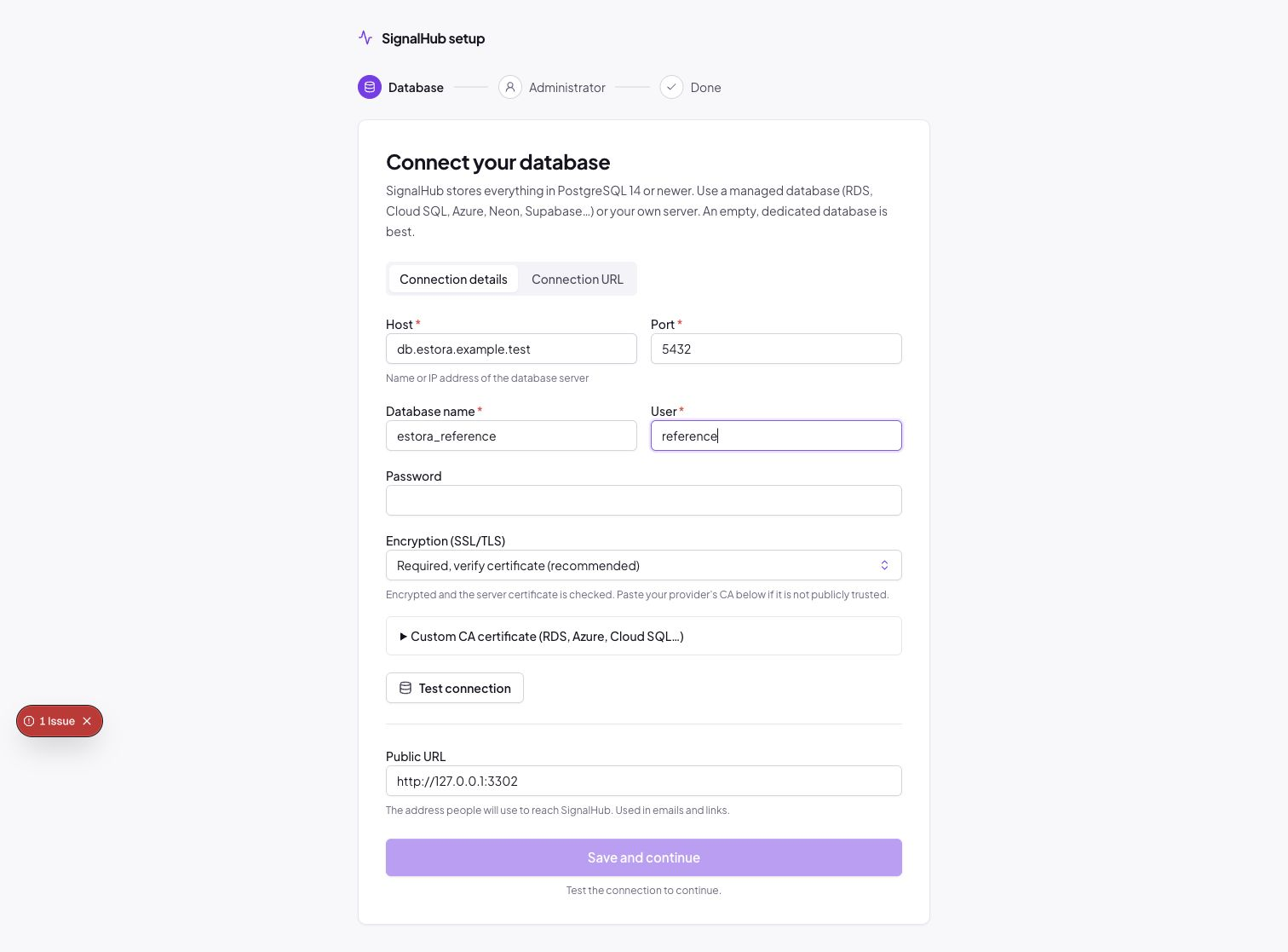
Prefer one string? The Connection URL tab takes
postgresql://user:password@host:5432/signalhub?sslmode=verify-fulland runs the same checks: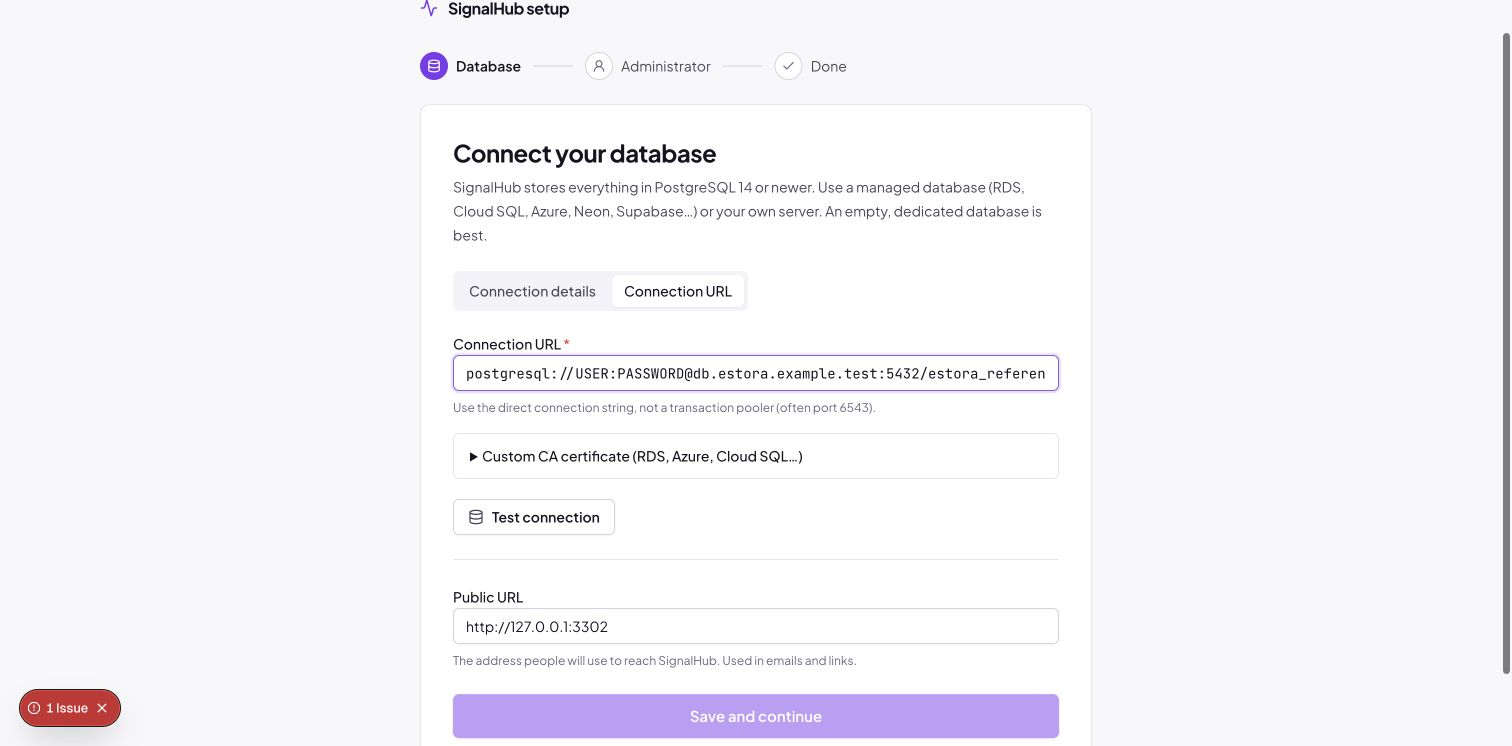
Administrator. Organization name and ID, your name, email, User ID and password (at least
PASSWORD_MIN_LENGTHcharacters, not containing your name or email). This account administers your organization and the installation. Download the configuration backup offered here (see Backups). Runtime settings can be reviewed after sign-in under Platform administration → Configuration → Runtime.Done. Sign in at
/loginwith the User ID and password you just chose.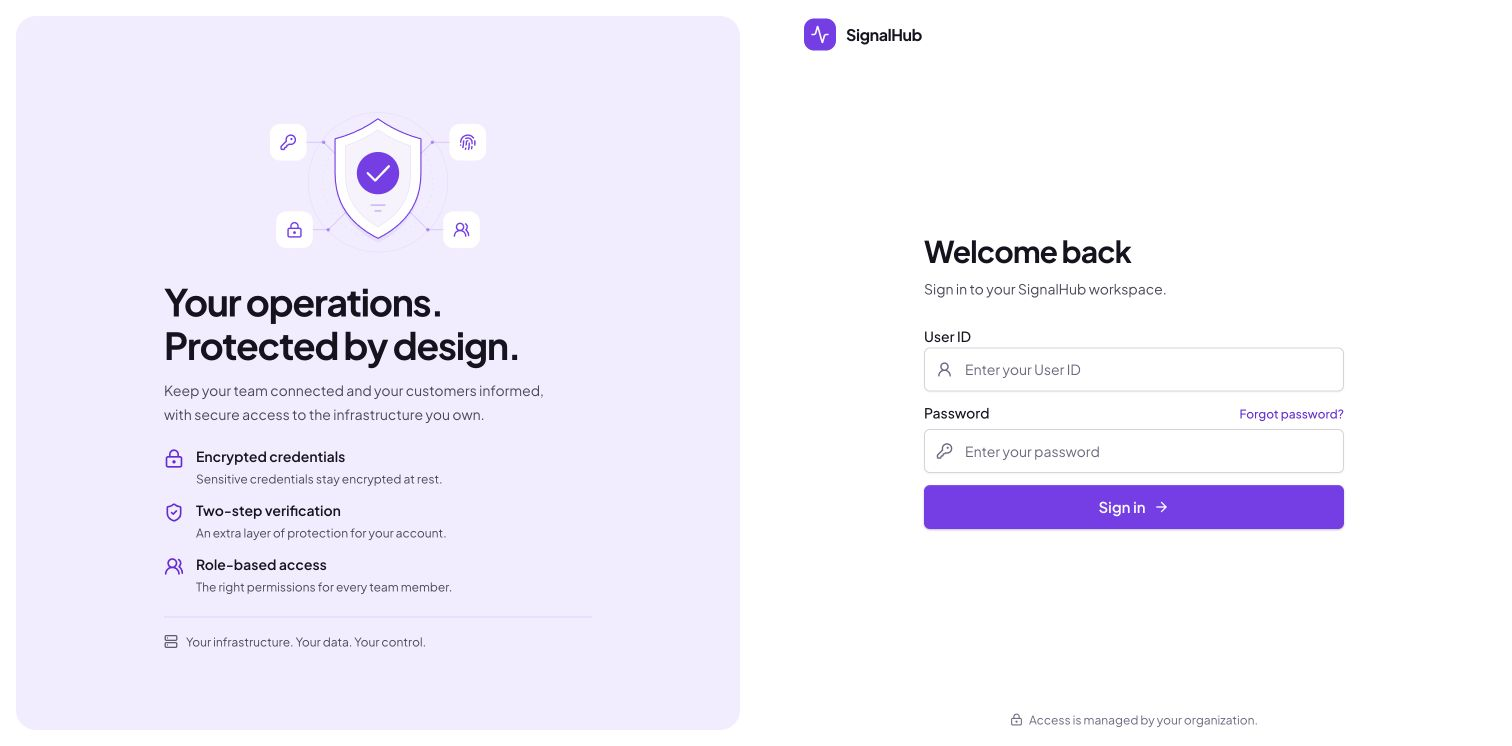
What the wizard leaves behind: the database schema, the first organization and administrator, and (Docker: /app/data, Node.js: ./data) a signalhub.json with the database URL, SESSION_SECRET, ENCRYPTION_KEY and public URL, readable only by the owner.
SignalHub generates SESSION_SECRET to sign login sessions and ENCRYPTION_KEY to encrypt saved credentials, MFA secrets and subscriber contact values. The wizard keeps both in signalhub.json; persist and back up the data volume. The encryption key is essential when restoring a database: without the original key, encrypted values cannot be read. See the key explanations and rotation guidance.
Terminal instead of browser: docker compose exec signalhub node dist-runtime/signalhubctl.mjs setup asks the same questions (passwords are not echoed), then docker compose restart signalhub. For automation pass --database-url, --admin-username, --admin-name, --admin-email, --org-name and --password-stdin.
No wizard at all: set DATABASE_URL, SESSION_SECRET, ENCRYPTION_KEY and STATUS_BOOTSTRAP_PASSWORD (plus optional STATUS_BOOTSTRAP_USERNAME, _EMAIL, _NAME, _ORG_NAME, _ORG_SLUG). On an empty database the administrator is created on start and must change the password at first sign-in. In .env for Compose, use SIGNALHUB_DATABASE_URL and SIGNALHUB_PUBLIC_URL (so a development DATABASE_URL in the same file never leaks into the container).
Database does not exist yet? If the server is reachable but the database is missing, the wizard (and signalhubctl setup) offers Create database, which works when the user has the CREATEDB privilege.
Restart setup (re-setup)
| Situation | What to do | What is kept |
|---|---|---|
| Typed the wrong database in the wizard | Wrong database? Start over with a different one on the administrator step | Nothing in either database is deleted |
| Move the installation to another database | signalhubctl setup --reset (asks to confirm), then restart |
Secrets (ENCRYPTION_KEY, SESSION_SECRET) and the old database |
| Start from nothing (throwaway installs only) | Stop, delete the data volume or ./data, drop the database, start again |
Nothing. This destroys the encryption key, so any backup of the old database becomes unreadable |
- In the wizard: before the administrator account exists, Wrong database? Start over with a different one takes you back to the database step. Nothing in that database is deleted.
- From the command line:
signalhubctl setup --resetforgets the saved connection and keeps the secrets. The next start runs the wizard again (docker compose restart signalhub, or restart the Node process).
Forgotten passwords
User forgot their password: Forgot password? on the sign-in page emails a one-time link valid for 30 minutes.
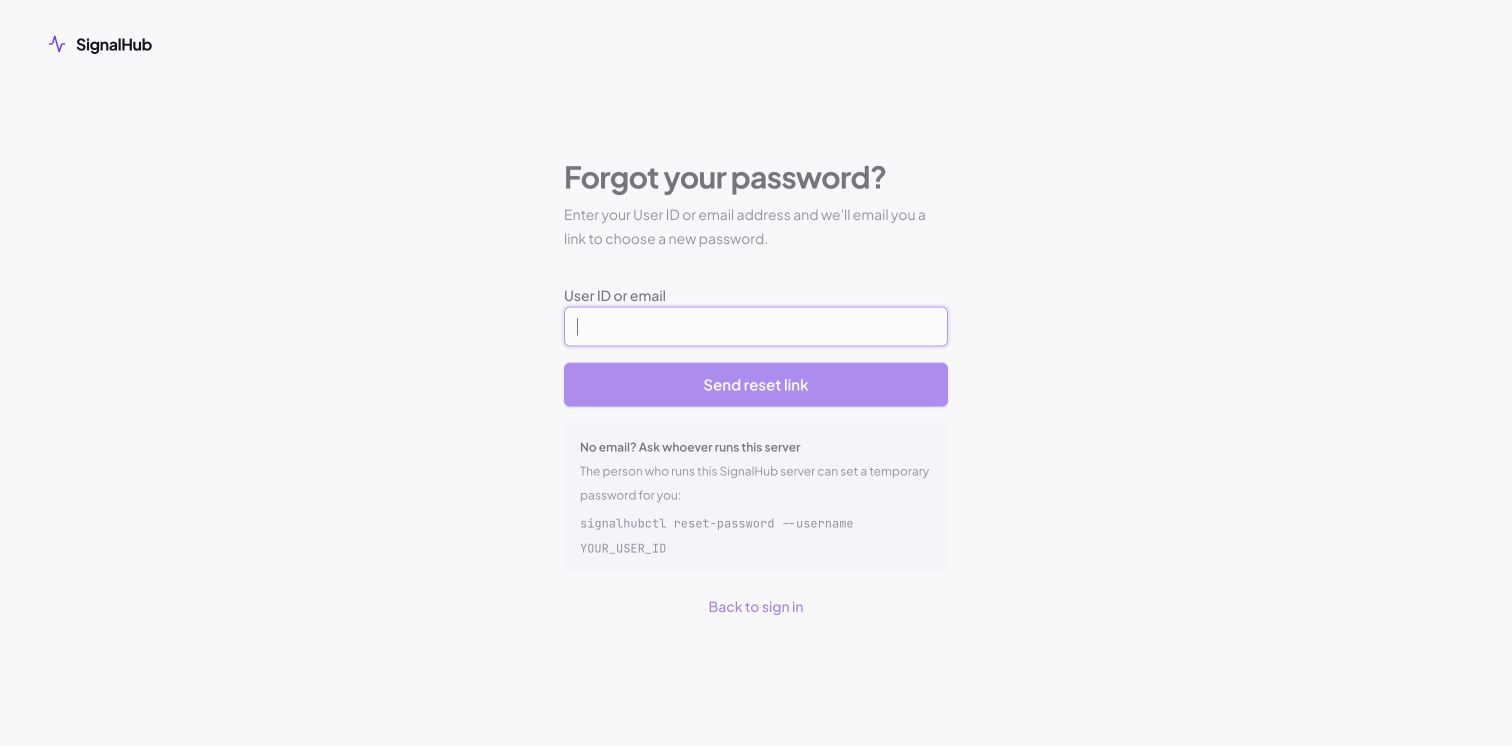
- The response is the same for unknown accounts, and requests are rate-limited.
- Resetting signs the account out everywhere; two-factor sign-in still applies (a password reset never bypasses or removes MFA).
- It needs email set up in the platform console (Configuration) and a configured public URL (
NEXT_PUBLIC_APP_URL). Otherwise the page explains who can help.
Operator recovery:
signalhubctl reset-password --username USER_IDsets a temporary password that must be changed at sign-in. Add--clear-mfafor a lost authenticator app: it deletes the person's devices and recovery codes and makes them enroll again at next sign-in. Administrators can also do this from the console (MFA guide).
How to run signalhubctl: with Docker, docker compose exec signalhub node dist-runtime/signalhubctl.mjs <command>; with Node.js, npm run signalhubctl -- <command> in the SignalHub directory.
5. Verify the install
curl -fsS http://127.0.0.1:3301/api/health/live    # process is up
curl -fsS http://127.0.0.1:3301/api/health/ready   # DB reachable, migrations current, worker heartbeat fresh

docker compose exec signalhub node dist-runtime/signalhubctl.mjs preflight   # config sanity (secrets, URL, proxy)
docker compose exec signalhub node dist-runtime/signalhubctl.mjs doctor      # runtime checks
preflight flags problems such as SESSION_SECRET shorter than 32 characters, a non-HTTPS NEXT_PUBLIC_APP_URL in production, or TRUST_PROXY_HEADERS=true without an explicit TRUSTED_PROXY_HOPS.
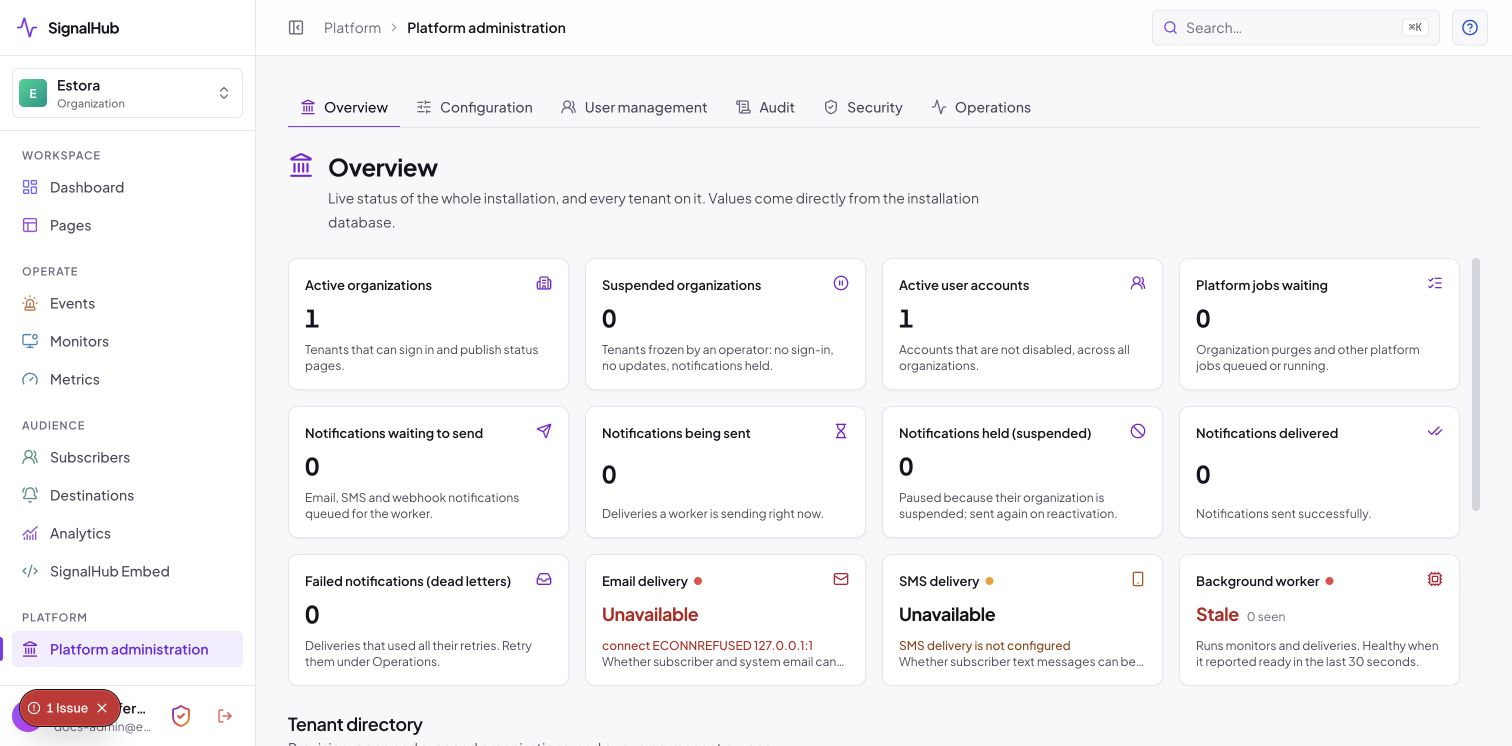
In the platform console (/organization/platform), the overview should show Database: Reachable, Migrations: Current and Worker: Ready:
6. Reverse proxy and TLS
Terminate TLS in front of SignalHub. Whichever proxy you use, set this in .env and restart:
NEXT_PUBLIC_APP_URL=https://status.example.com # canonical public URL; login breaks if this is wrong
Proxy headers need no variables: the default Auto mode trusts X-Forwarded-For only from private or loopback connections, where reverse proxies normally run. Review it under Platform administration → Configuration → Visitor addresses and reverse proxy, which shows what was detected and why a mode is recommended. Setting TRUST_PROXY_HEADERS (auto, true, false) or TRUSTED_PROXY_HOPS in the environment overrides the page. Use true only when your proxy reaches the app from a public address and is the only way in; otherwise clients can spoof their IP and bypass rate limits and CIDR allowlists. Details: Client IP and reverse proxies.
Caddy (automatic HTTPS)
status.example.com {
    encode zstd gzip
    reverse_proxy 127.0.0.1:3301
}
nginx
server {
    listen 443 ssl http2;       # nginx 1.25.1 or newer: write "listen 443 ssl;" and add "http2 on;"
    server_name status.example.com;

    ssl_certificate     /etc/letsencrypt/live/status.example.com/fullchain.pem;
    ssl_certificate_key /etc/letsencrypt/live/status.example.com/privkey.pem;

    client_max_body_size 10m;   # branding uploads

    location / {
        proxy_pass http://127.0.0.1:3301;
        proxy_set_header Host              $host;
        proxy_set_header X-Real-IP         $remote_addr;
        proxy_set_header X-Forwarded-For   $proxy_add_x_forwarded_for;
        proxy_set_header X-Forwarded-Proto $scheme;
    }
}

server {
    listen 80;
    server_name status.example.com;
    return 301 https://$host$request_uri;
}
Optionally restrict the installation console to your office or VPN: PLATFORM_ADMIN_ALLOWED_CIDRS=203.0.113.0/24,10.0.0.0/8 (IPv4 CIDRs; requires correct proxy settings above).
7. First-run configuration
Done in the UI, no restart needed.
- Email delivery (platform console, Configuration). Pick a preset (Amazon SES, Brevo, Mailgun, Postmark, Resend, SendGrid, Microsoft 365, Gmail, and more) or a custom SMTP server. Without it, subscribers cannot receive email.
- SMS delivery (optional, same page). Twilio, Vonage, Plivo, Telnyx, Sinch, ClickSend, Textmagic, Africa's Talking.
- Team destinations (optional). Enable the chat/on-call channels your teams use (Slack, Teams, Discord, PagerDuty, Opsgenie, ntfy and more).
- Create your first page (Pages → New page), add components, then add monitors so components update themselves.
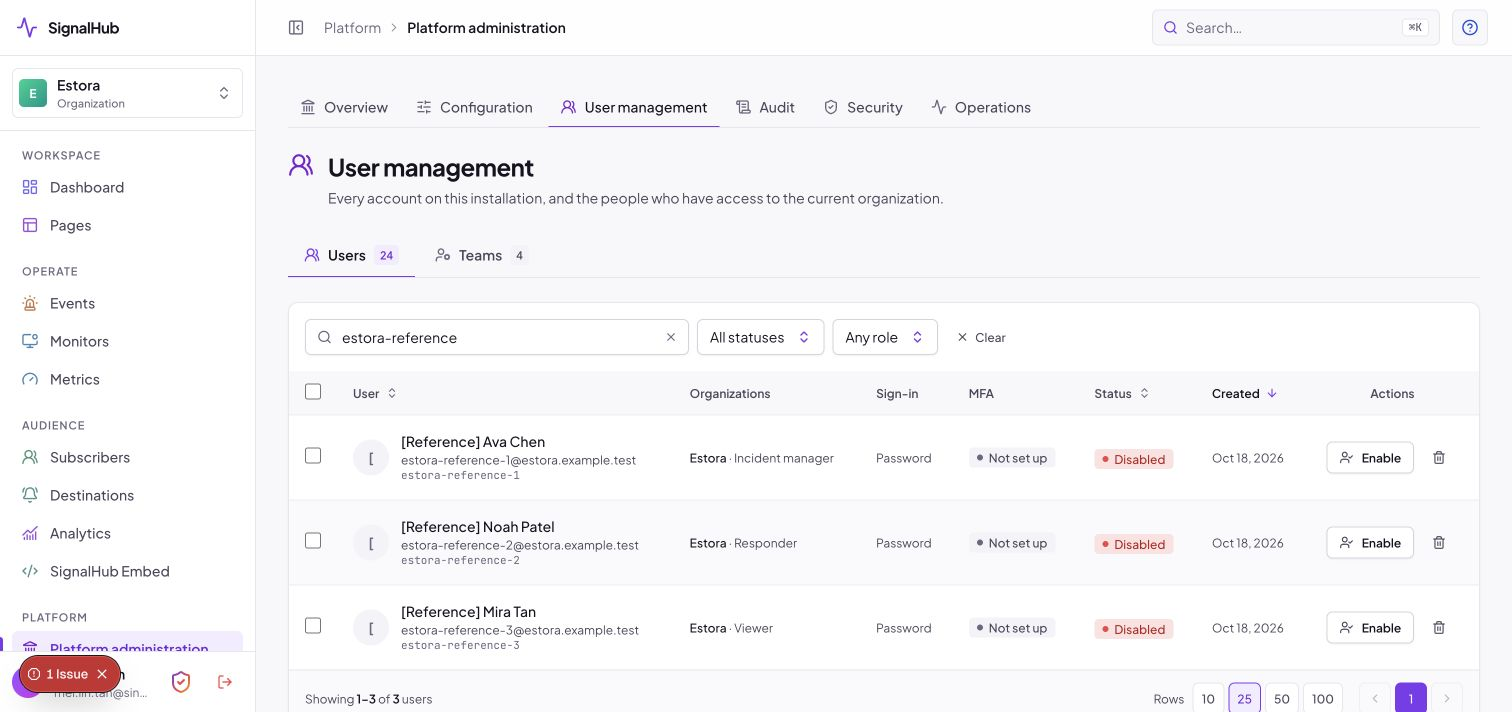
- Invite your team (platform console → User management → Teams). Roles: Admin, Incident Manager, Responder, Viewer.
- Single sign-on (optional). Platform console → Identity: OIDC, SAML 2.0 and SCIM 2.0 provisioning, per organization or installation-wide.
- Multi-factor authentication (recommended for production). See Turn on MFA below.
Turn on MFA
Authenticator-app codes (Google Authenticator, Microsoft Authenticator, Authy, 1Password and similar) protect every sign-in. It is off by default so a fresh install is never locked, and it is one switch.
- Create a second administrator first (User management → Teams). A lost-device request must be approved by another administrator.
- Set up email (step 1 above) and the public address so people get security notices and the "this wasn't me" link.
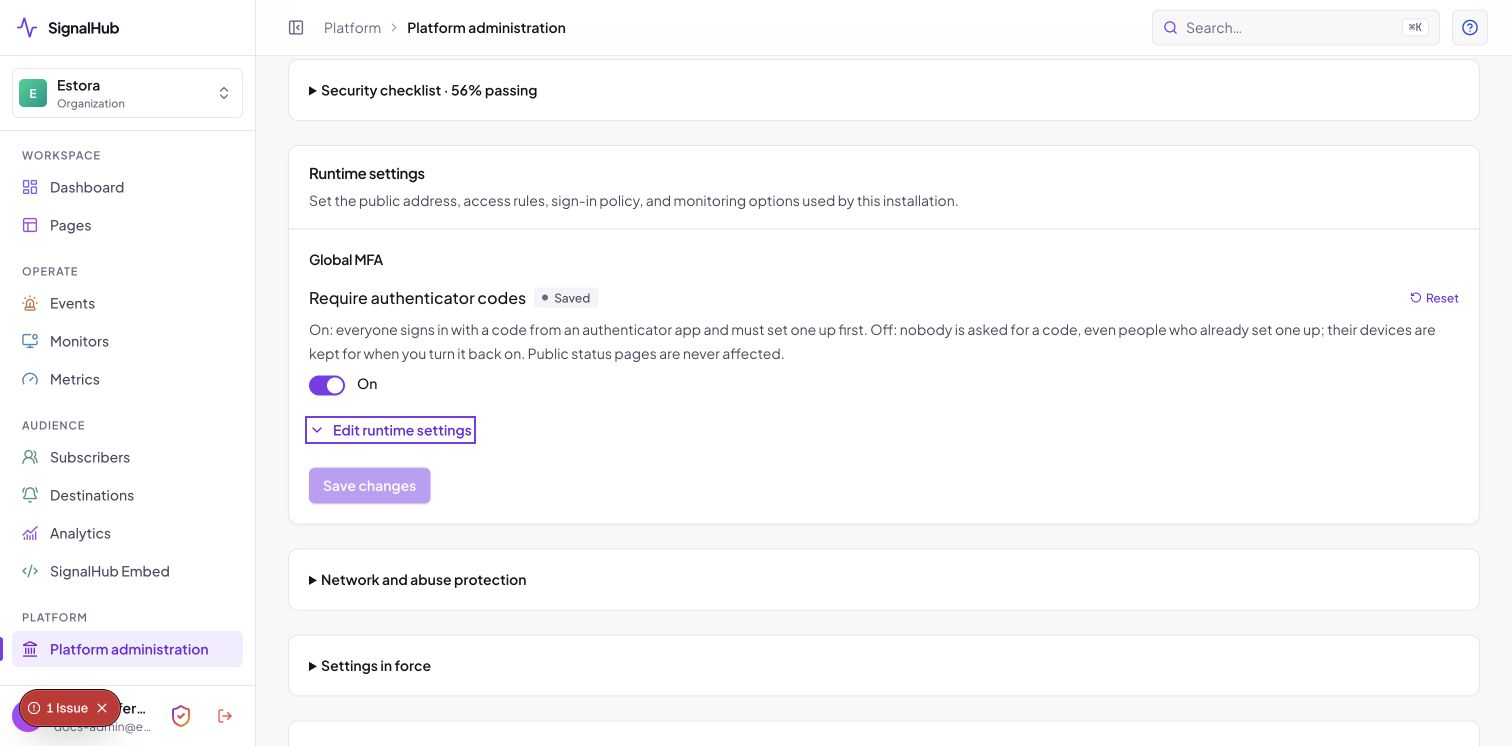
- Go to Platform administration → Configuration → Runtime → Sign-in policy and switch on Require authenticator codes, then save and press Keep within two minutes.
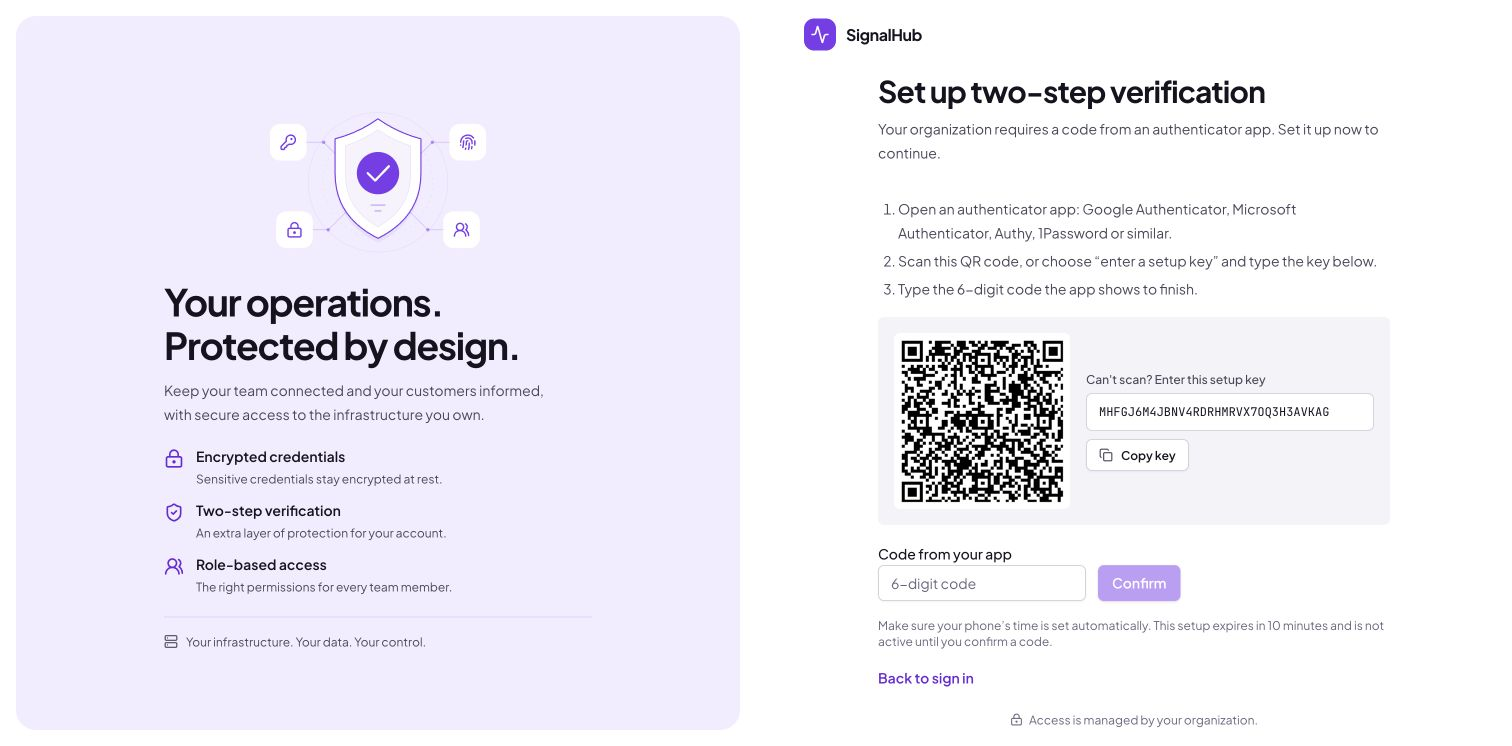
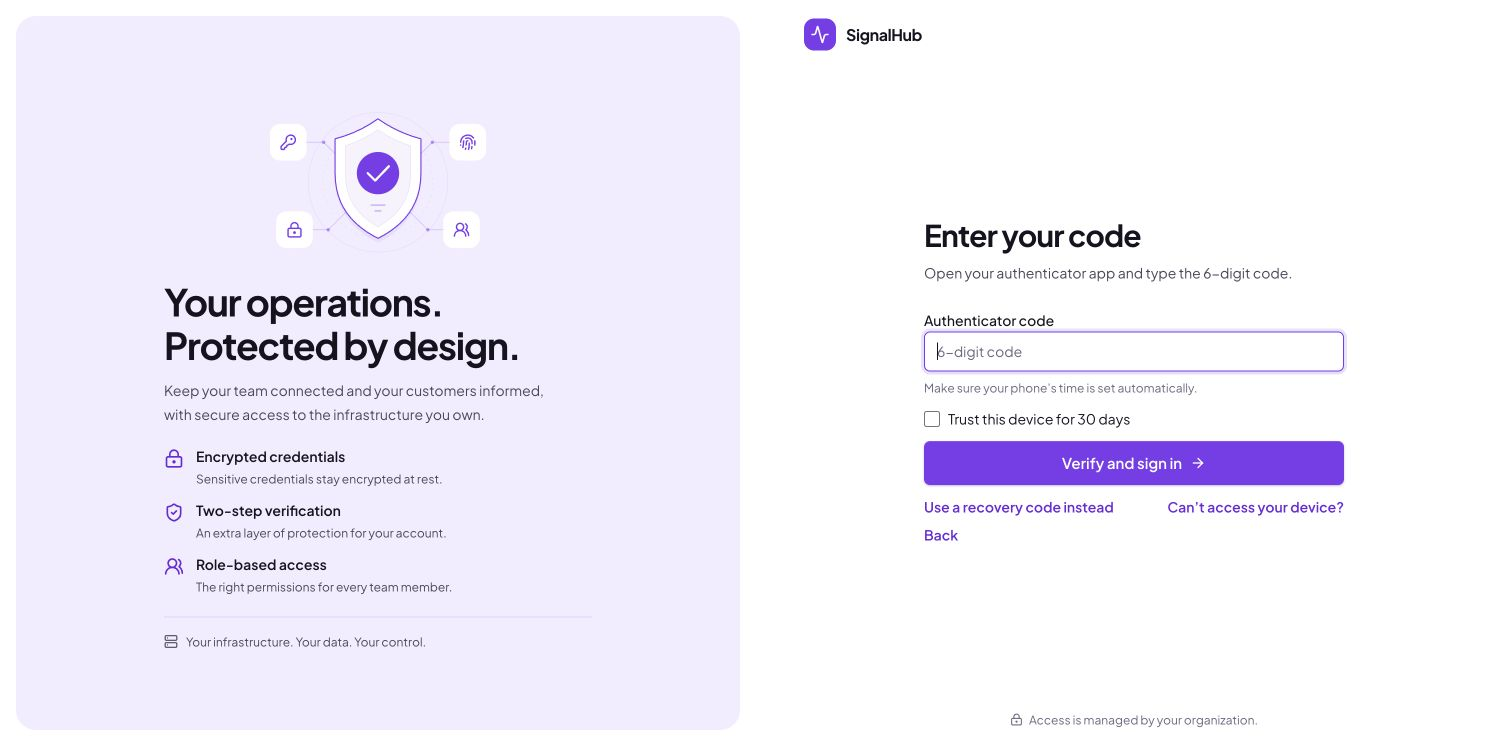
- Everyone else is signed out. At their next sign-in they enter their password and are taken straight to setup: scan the QR code, type the code, save the one-time recovery codes.
Then they sign in with a code every time (optionally trusting a browser for 30 days):
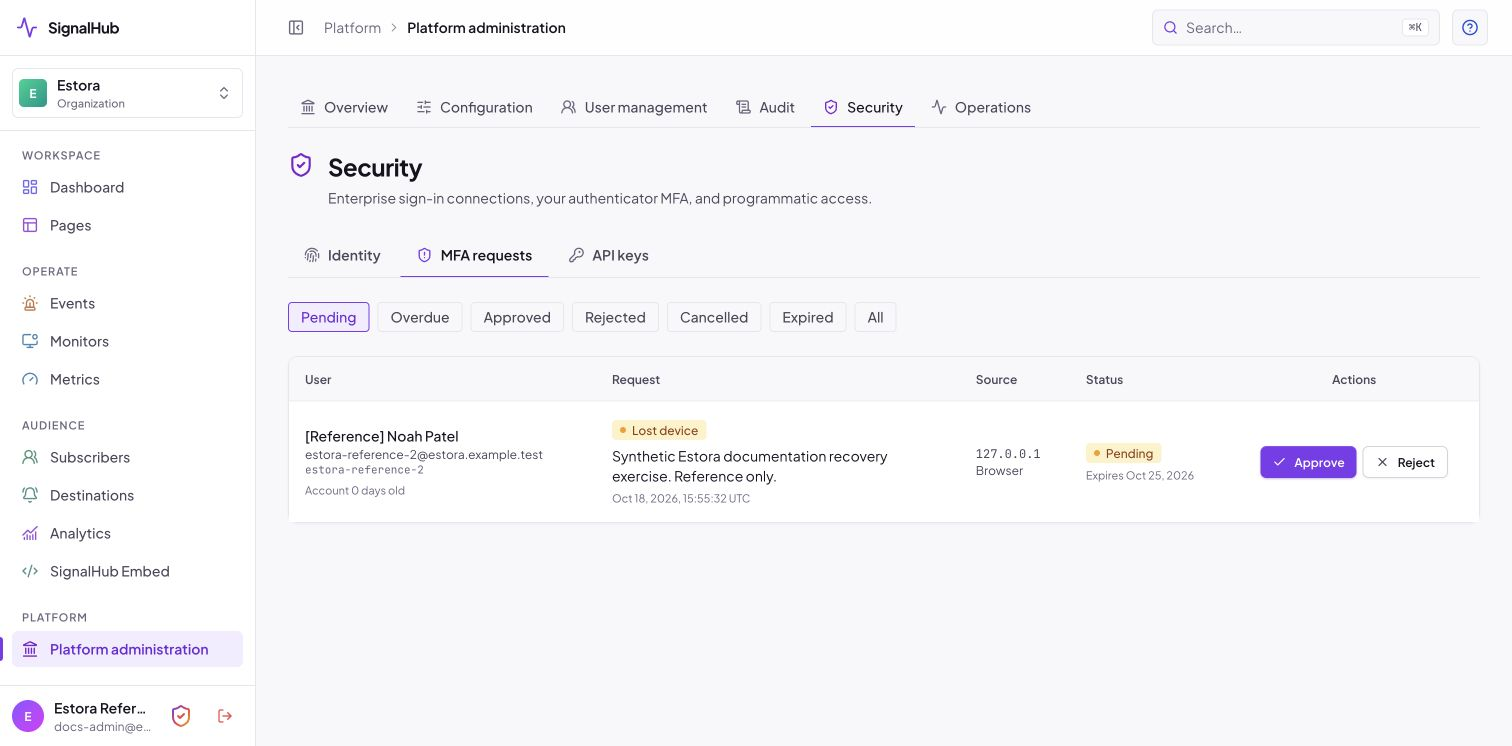
Lost phones go through Platform administration → Security → MFA requests, where another administrator approves with their own code and the person re-enrolls at next sign-in:
If nobody can sign in, the server operator can reset one person from the shell (see operator recovery). The full guide, security design and limits are in mfa.md.
Legacy SMTP_* and TWILIO_* environment variables are imported once by db:migrate for upgrades and then ignored; manage providers in the console.
8. Prebuilt container image
Tagged releases (v*) are built by release.yml as a multi-arch (amd64 + arm64) image published to GitHub Container Registry with an SBOM and build provenance, and signed with cosign.
docker pull ghcr.io/rameshbgm/signalhub:<version>

# verify the signature (keyless, from the GitHub Actions workflow identity)
cosign verify ghcr.io/rameshbgm/signalhub:<version> \
  --certificate-identity-regexp 'https://github.com/rameshbgm/signalhub/.github/workflows/release.yml@.*' \
  --certificate-oidc-issuer https://token.actions.githubusercontent.com
To run Compose from the prebuilt image instead of building locally:
# .env
STATUS_IMAGE=ghcr.io/rameshbgm/signalhub:<version>

docker compose pull signalhub
docker compose up -d --no-build
No tagged release exists yet in a fresh fork. Push a
v*tag to your repository to produce the first image, or letinstall.shbuild locally.
9. Scaling
Web and worker replicas can be scaled freely: they share one PostgreSQL database (including uploaded images and exports), and jobs and sweeps are lease-based and idempotent. On one host, run more signalhub containers against the same database with environment variables (not the wizard's file); across hosts use the Kubernetes manifests or a cloud platform.
Scaling knobs live in configuration.md: WORKER_MONITOR_CONCURRENCY, WORKER_NOTIFICATION_BATCH, DATABASE_POOL_SIZE.
10. Upgrades and rollback
# 0. back up first (section 11)
git pull
docker compose build
docker compose up -d          # start.mjs migrates before starting web and worker
docker compose exec signalhub node dist-runtime/signalhubctl.mjs migrate --check
- Migrations are plain, forward-only SQL files in
db/migrations/applied on every start bystart.mjs(serialized with an advisory lock, so several replicas are safe). Treat a failed migration as a failed release; fix it before retrying. - Rollback = restore the pre-upgrade database backup and redeploy the previous image. Do not run an older image against a newer schema.
- Pin images by tag or digest in production; do not track
latest.
11. Backups
Two things must be backed up, and kept in different places:
| What | Why | How |
|---|---|---|
| PostgreSQL | Pages, incidents, subscribers (encrypted), users, audit chain, uploaded images and exports | pg_dump or signalhubctl backup |
| Configuration and secrets | ENCRYPTION_KEY decrypts stored credentials and subscriber contacts. Without it a restored database is partly unreadable |
The wizard's Download backup, or copy signalhub.json / your environment variables |
Back up
# database, custom format (works from any host with PostgreSQL client tools)
pg_dump -Fc "$DATABASE_URL" > signalhub-$(date +%F).dump

# bundled PostgreSQL container
docker compose exec -T postgres pg_dump -U signalhub -Fc signalhub > signalhub-$(date +%F).dump

# or with SignalHub's own tool: dump plus a SHA-256 manifest
DATABASE_URL=postgresql://... npm run signalhubctl -- backup --output /backups/signalhub.dump

# configuration and generated secrets (wizard installs)
docker compose cp signalhub:/app/data/signalhub.json ./signalhub-config-$(date +%F).json
chmod 600 signalhub-config-*.json
The configuration file contains secrets: store it in a password manager or encrypted storage, never next to the database dump. Schedule the dump with cron or a systemd timer, copy it off the host and keep several generations. On managed PostgreSQL (RDS, Cloud SQL, Azure) also enable point-in-time recovery.
pg_dump in detail
pg_dump is PostgreSQL's own logical backup tool. SignalHub keeps everything in one database, so one dump captures the whole installation (everything except the secrets in the configuration file).
1. Install the client tools. The pg_dump major version must be the same as or newer than the server's; an older client refuses with pg_dump: error: aborting because of server version mismatch.
| Where | Command |
|---|---|
| Debian / Ubuntu | sudo apt install postgresql-client (for a newer version add the PGDG repository, then postgresql-client-18) |
| RHEL / Fedora | sudo dnf install postgresql |
| macOS | brew install libpq && brew link --force libpq |
| No install | run it inside a container: docker run --rm postgres:18 pg_dump ... |
Check with pg_dump --version and psql "$DATABASE_URL" -Atc "show server_version".
2. Connect without leaking the password. A password inside DATABASE_URL shows up in the process list and shell history. Prefer one of:
# a) environment variables (pg_dump reads the standard libpq ones)
export PGHOST=db.example.com PGPORT=5432 PGUSER=signalhub PGDATABASE=signalhub
export PGPASSWORD='...'              # or use a password file:

# b) ~/.pgpass, one line per server: host:port:database:user:password
echo 'db.example.com:5432:signalhub:signalhub:s3cret' >> ~/.pgpass && chmod 600 ~/.pgpass

# c) TLS settings travel with the connection string
export PGSSLMODE=verify-full PGSSLROOTCERT=/etc/ssl/certs/provider-ca.pem
Use the direct connection, not a transaction pooler (the same rule as for the app). The backup user needs SELECT on every table; the application's own database user is simplest.
3. Run it.
pg_dump --format=custom --compress=6 --no-owner --file=signalhub-$(date +%F).dump
| Flag | Why |
|---|---|
--format=custom (-Fc) |
Compressed, can be restored selectively and in parallel with pg_restore. Use this one. Plain SQL (-Fp) is larger and restored with psql instead |
--compress=6 |
zstd/gzip level, a good size/speed balance. --compress=0 for none |
--no-owner |
Restores cleanly under a different database user (new host, managed provider). Add --no-privileges if grants differ too |
--file |
Write to a file; avoid > redirection on Windows shells, which can re-encode the output |
--jobs=N |
Parallel dump, directory format only (-Fd --file=dir/). Worth it above a few GB |
--lock-wait-timeout=60s |
Fail instead of hanging if a lock cannot be taken |
pg_dump runs in a single snapshot transaction: it does not block readers or writers, and the dump is consistent as of the moment it started. SignalHub can keep running. A dump of a database with large uploads or exports takes longer, but nothing else is needed for them: uploaded images and exports live in the database.
4. Inside Docker.
# bundled PostgreSQL service from deploy/compose/postgres.yml (-T: no TTY, so binary output is not mangled)
docker compose exec -T postgres pg_dump -U signalhub -Fc signalhub > signalhub-$(date +%F).dump

# external database, using a throwaway container as the client
docker run --rm -e PGPASSWORD postgres:18 \
  pg_dump -h db.example.com -U signalhub -Fc signalhub > signalhub-$(date +%F).dump
Always redirect to a file on the host, not inside the container, or the backup is lost with the container.
5. Verify every backup. An unchecked backup is a hope, not a backup.
pg_restore --list signalhub-2026-01-31.dump | head      # fails on a truncated or corrupt file
sha256sum signalhub-2026-01-31.dump > signalhub-2026-01-31.dump.sha256
ls -l signalhub-*.dump                                   # a sudden size drop is a warning sign
signalhubctl backup does the dump and writes the SHA-256 manifest in one step, and signalhubctl restore --archive FILE (without --execute) re-checks it.
6. Automate it. A minimal nightly script with 14-day retention (adjust paths; the dump runs as a user that has ~/.pgpass or PGPASSWORD set):
#!/usr/bin/env bash
# /usr/local/bin/signalhub-backup.sh
set -euo pipefail
dir=/var/backups/signalhub; mkdir -p "$dir"
file="$dir/signalhub-$(date +%F-%H%M).dump"
pg_dump --format=custom --no-owner --file="$file.tmp"
pg_restore --list "$file.tmp" >/dev/null     # verify before keeping
mv "$file.tmp" "$file"
find "$dir" -name 'signalhub-*.dump' -mtime +14 -delete
# ship it off the host, for example:
# rclone copy "$file" remote:signalhub-backups/   (or aws s3 cp, restic backup, ...)
# crontab -e   (02:15 every night, log failures)
15 2 * * * /usr/local/bin/signalhub-backup.sh >> /var/log/signalhub-backup.log 2>&1
Test that the cron job really produces files after the first night, and alert on a missing or empty file (a monitor of type heartbeat on your own SignalHub works well: curl its ping URL at the end of the script).
7. Protect the dump. It contains personal data (subscriber contacts are encrypted with ENCRYPTION_KEY, but user records, audit entries and incident text are not). Keep it on encrypted storage, restrict access (chmod 600), encrypt before leaving the host (age, gpg or your backup tool's encryption), and delete old generations as your data retention policy requires.
Common errors
| Message | Cause and fix |
|---|---|
server version mismatch |
Client older than the server: install a newer postgresql-client or use the container form above |
password authentication failed |
Wrong password, or ~/.pgpass has wrong permissions (must be 0600) or does not match host, port, database and user exactly |
SSL error: certificate verify failed |
Set PGSSLROOTCERT to the provider CA, or PGSSLMODE=require on a trusted private network |
permission denied for table ... |
The backup user lacks SELECT: use the application's database user or grant pg_read_all_data (PostgreSQL 14+) |
could not connect ... Connection refused |
Wrong host or port, firewall, or the Compose database port is only bound to the Docker network (use docker compose exec) |
| Dump file is 0 bytes or ends abruptly | Disk full, or the pipe was cut: run the verify step and check df -h |
Restore
Start the same image version (or newer) with the original
ENCRYPTION_KEYandSESSION_SECRET: putsignalhub.jsonback in the data directory, or set the environment variables. The wizard is skipped when a database and administrator already exist.Check the dump, then restore into an empty database (
--executedrops existing objects):DATABASE_URL=postgresql://... npm run signalhubctl -- restore --archive /backups/signalhub.dump DATABASE_URL=postgresql://... npm run signalhubctl -- restore --archive /backups/signalhub.dump --execute --confirm RESTORE # or directly: pg_restore --clean --if-exists --no-owner -d "$DATABASE_URL" signalhub.dumpStart SignalHub, then verify:
signalhubctl migrate --check,signalhubctl audit,/api/health/ready, and open a status page.
Restore into a scratch environment first and time it: that is your real recovery time. Full runbook, restore drill and key rotation: Operations: backup and restore.
12. Troubleshooting
| Symptom | Likely cause | Fix |
|---|---|---|
Every page redirects to /setup |
No database or no administrator yet | Finish the wizard; the token is in docker compose logs signalhub |
| Wizard: "does not accept TLS" | Database without TLS on a private network | Choose encryption Disabled (only on a private network) |
| Wizard: "certificate is not trusted" | Provider uses a private CA | Paste the provider's CA certificate in the wizard (DATABASE_SSL_CA) |
| Wizard: "looks like a transaction pooler" | Pooled connection string | Use the direct connection (often port 5432) |
| Bundled database: "Set POSTGRES_PASSWORD in .env" | deploy/compose/postgres.yml without a password |
Re-run ./install.sh or set POSTGRES_PASSWORD |
| Login loops or redirects to the wrong host | NEXT_PUBLIC_APP_URL doesn't match the URL in the browser |
Set it to the exact public https:// URL and restart |
| Everyone shares one IP / rate limits too aggressive | Proxy connects from a public address, so Auto ignores its header (or the setting is Off) | Platform administration → Configuration → Visitor addresses: choose On and set the number of proxies |
/api/health/ready returns not ready |
Worker not running or migrations pending | docker compose ps, docker compose logs signalhub |
| Monitors never run, subscribers get nothing | Worker down (platform console shows Worker: Stale) | Restart the worker; check logs |
| Emails not arriving | No SMTP configured | Platform console → Configuration; check Notification logs |
| ICMP monitors fail | Disabled or missing capability | MONITOR_ENABLE_ICMP=true; image includes ping |
| Monitor target rejected | SSRF guard blocks private/loopback ranges | Intended. Opt out only for trusted networks with MONITOR_ALLOW_PRIVATE_TARGETS=true |
preflight warns about HTTPS |
Production URL is http:// |
Terminate TLS and use https:// |
| Authenticator code always rejected | The phone's clock is off, the code was already used, or the account is locked (15 minutes after five wrong codes) | Turn on automatic date and time on the phone, wait for the next code; an administrator can unlock under User management |
| Nobody can sign in after turning MFA on | The only administrator lost their device and has no recovery code | docker compose exec signalhub node dist-runtime/signalhubctl.mjs reset-password --username USER_ID --clear-mfa, or turn the switch off with signalhubctl settings reset --key mfaEnabled |
| MFA emails do not arrive | No email provider, or NEXT_PUBLIC_APP_URL unset |
Platform console → Configuration; MFA itself works without email |
Still stuck? Open an issue with the output of docker compose logs --tail=200 signalhub (redact secrets).